'/%3e%3cdefs%3e%3cpattern%20id='pattern0_2104_4598'%20patternContentUnits='objectBoundingBox'%20width='1'%20height='1'%3e%3cuse%20xlink:href='%23image0_2104_4598'%20transform='matrix(0.00376176%200%200%200.0172414%20-0.00219436%200)'/%3e%3c/pattern%3e%3cimage%20id='image0_2104_4598'%20width='267'%20height='58'%20preserveAspectRatio='none'%20xlink:href='data:image/png;base64,iVBORw0KGgoAAAANSUhEUgAAAQsAAAA6CAMAAACQ2ozcAAAAM1BMVEVMaXH////////////////////////////////////////////////////////////////x7/yuAAAAEHRSTlMAoDDgEPBgwIBAINCwkHBQDIOTDwAAAAlwSFlzAAFxGAABcRgB7MGwCAAABm1JREFUaIHlW+uWsyoMLSIIeH3/pz0CKrmgQuusdn0nf2YaMW42kISgr1cQK+SySj+61/9cmm45RLTfRvNV0WoBIptv4/mi6AWLuiVDd0lKmLPGGPsA0nelGG8TZoXU69poTPi/v1smBjB338dZxvk218B/VIrxBl8hth9t73+Zp2x7SdNuLMX+tJTitZCKjQx1MzFquLBVc+hvpBSv8NMX/Hb+Bv2MbS8DaNsVYn9aSvFK2nWB5slHtr0sUL4Ur0vx+usowdL3A1jBhUVcfGmR1HCBFPbvuWhskvuefC4/wkWbWyMgzV2ub39GarhA+cf0KBevHrTdffSvcuGxonzCA73JBGq4gFnt7qN/lYtxwflEWOA3KWJVriWOpkd0+lUuQj6Rsu6QkcuL9jW2o4xbyzTZfpWLOG79FlatgnP5Y9tRnFn3RAYE7p/loo1bJ6GtnSLIYbuwRrz8rq6SCyY/y8W2UU0SFkw7xQCghszN/y4Xr0ZCKjpPxQz46Vjdj9pupiHUBsxclmRXcOG0CKZHfVV9dHqM1QmRrZNU4IVN15kwQ98fNHSlYNsaUsmmEUw899gNuQCck2ur17KwZXcypM6gsVSCtSN4YcozzLmWqtvbNCPRUDKgbU07RiC/z8XgmOnMtHNiYUJZu8Tbg8YW3B6HOK6PwRPQRo1sT21nBGVq73OxKNaElx8n3iiAR4CL8YbOHlH0YHnXtAL2osg2Gr8PuMgIIaPNTIooqIJdijfkyFO6b6u9gBTDo1M1PKOK6bNcYCBtf9Gwqcc7LHgr1qqFaHil69Y2KAY9zMWe/Ny3BWSU4vVdZ3UtvCHxGuQD7m2nmfY0FyBBGK8bJidXitf/gxbA7DVQwStdBbbVng48zsUxMexdy7EWr/8H9dw/QjJNLRfHKnmci2Pk5G1LW4nX/2U9x5p5eYOLvYj6PBfb+qXHfacWy/H6P6yuhavBfl1Cl0VtK7MaaGcS30wZF6ny2WS4kD71ttjyZgXHEDk5j4Ew2dTh9SbREYCEqA/NBBXY9pHX4E2eLOPiRQT1RsDAv0sc7QZhOHowIwxjHd4wDcDEmCJ1jmjQREG2werBxt3HXKRIwE+cEAYwmMijygze/hxvrq6FNJp0mNp2Zxf0x1ykWD8zLmA7lIChqe+u8U4Eb2goLbjYSaCJdnDqC20jR4JOAMzHXADYjAs4pCj5QYvH3uCFVjy66IR6Y8zoSfDlPr1rhEKdyHCB64GwJ8PHXAA144L3eBcYaw3DixwfW3skqw+GcUpHj1fP60TwSveXXKDRP7fAubjBi2bKwnrAT5p/gAsEEFuA41jNBQ60YZEip8Lq4r/NBexOLRfbvX0XfGZY5i5uVjcNOzs6tz0S23/GhYNctKcWKrmI4Sq+2BlebpRm9FSY8IRYcVTndS3si6DrEX/JBfKdeKjgitcMLw4DxNf7oVcHW/viSLt/kfqV46KHF9BofR5Tr7iA0QKhg6lIJqZe4Q3hExAroJEgIe6c17XgpEOeZy7ighatS7mA0RDlTyiJr8Obr2sJqjmva4H1g7eObREXNEiVcoGeBWqKuXy7FG9kBEhwfyjPZG9wkQOVfJlgS/Bu9+wbyy5z7YoLNL2XfgNMisFTBd6+qH5xW9fqjbV6JLUVfc4FzuS6yVoz3Lyzw7jAi2SlfrWiBTkhaOvwZrnomaa6lrNPxRwX2ft1JRe3Jb40mUvxkmc+Vtcy0NyFjgIv5oJOjEz39nVXitf/Rb6c+4txufQXWTkqpjkuXrnDLlnLhcsfmSU5Up9SvP7ZvK7F4shFXSsrB5lZLrLHXbzGd80FziS4pN15Kd6QXIGJYUhftolyXtfKSgrBWS5c7p6plguyayJyFmcv8IZRT1nmHnKJ5jzvzAoormS5yFoYqrm4AgI//LjFu3cvkKvioLQp2qlIlQseSuEXQYDt7JqFiVmei+wqqeeCfBIFewcT5XK80R+rwZgNx/F60qEhm3Zgu+HHuxK54hMucmTYei5e7B2NCD37hknAy9tDvPS0WjDNef1iTUQMploZvKc942L/3Aj0sXmDi9UOGw0KoQovzAPD2miRhr35mr7fCo3BO0K9pq/ONOBbL03NpIfIcXNQI2gP2gIteym5gSmkGvgbmRd4J/aqj93zFiUc1VCSc+K0WWWytd+HtHZ678YTQ2Yu+4jSzVePbcNVe6n51+U/wZKesx3N5aEAAAAASUVORK5CYII='/%3e%3c/defs%3e%3c/svg%3e)

Card Status Management
Introduction
Card status is a core part of the security, risk, and operational lifecycle of every Bitnob virtual card.
Understanding how and when a card transitions between states helps your team:
Build better UX for your users,
Reduce fraud and chargebacks,
Respond intelligently to issues,
Ensure cards remain functional only when safe to do so.
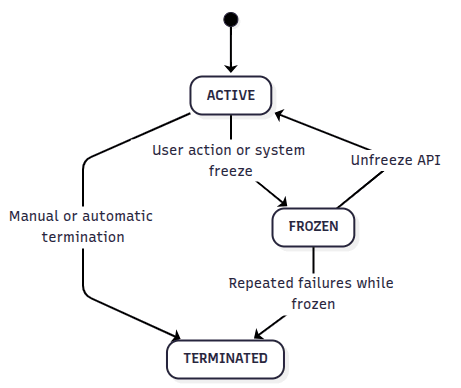
Bitnob virtual cards operate under a strict three-state model:
[ACTIVE] ⇄ [FROZEN] → [TERMINATED]
Card States Explained
ACTIVE
Definition:
The card is fully operational. It can be used for all online transactions that fall within card and platform limits.
When does a card become ACTIVE?
Immediately upon successful creation via API.
After being unfrozen (if previously frozen).
What can an ACTIVE card do?
Authorize transactions,
Receive refunds,
Perform recurring/subscription payments (if supported),
Be frozen or terminated by the platform or Bitnob.
What to build:
If you're showing card state in your app, show "Active" as a green or ready status.
Always check that a card is active before initiating top-up or sending cardholder instructions.
FROZEN
Definition:
The card is temporarily suspended. It cannot perform any transactions until reactivated.
A frozen card:
Cannot authorize new transactions,
Cannot be funded,
Can still receive settlements for transactions that were already authorized before the freeze,
Can be reactivated (unfrozen) unless otherwise escalated.
Who can freeze a card?
You (the platform) via Update Card Status,
The user (via your app or dashboard),
Bitnob’s system (automatically via fraud, refund, or risk logic).
Reasons Cards Are Frozen Automatically
reason | description |
|---|---|
Fraud Suspicion | The system detects abnormal usage patterns, unusual merchant activity, or velocity violations. |
Unauthorized Refunds | A refund arrives for a card that was never used at the original merchant. |
Example: | A $20 refund from AliExpress is received on a card that never spent at AliExpress → card is frozen automatically. |
Restoring a Frozen Card
To unfreeze, your app can:
Call the unfreeze endpoint,
Trigger user verification or support flow,
Monitor the virtualcard.transaction.declined.frozen webhook and take UX action.
❗ Cards frozen for fraud may require compliance review before being reactivated.
TERMINATED
Definition:
The card is permanently deactivated. It cannot be used, funded, or reactivated.
Once terminated:
The cardholder must be issued a new card to continue transacting.
The card remains visible in transaction history for audit and dispute purposes.
Who can terminate a card?
You (via API),
Bitnob (automated),
The user (optional flow via your frontend).
Reasons Cards Are Terminated Automatically
trigger | description |
|---|---|
Fraud Confirmation | If flagged behavior is confirmed as high-risk or abusive. |
Multiple Failed Transactions | Excessive transaction declines indicate abuse or improper configuration. |
Card Usage Violations | Attempts to use at disallowed MCCs, unsupported countries, or expired sessions. |
Repeated Unsettled Authorizations | Cards are permanently terminated on the 3rd decline rule violation, after the decline fee is charged. |
Decline Thresholds That Trigger Termination
For full details on decline thresholds, fee schedules, and how to avoid violations, see the Decline Rule Policy.
Status Transition Model
Developer Guide
Reference for each call: Update Card Status for freeze/unfreeze, Terminate Card, and Get Card to read the current status.
action | api endpoint |
|---|---|
Freeze a card | POST /api/cards/:cardId/status with { "status": "frozen" } |
Unfreeze a card | POST /api/cards/:cardId/status with { "status": "active" } |
Terminate a card | DELETE /api/cards/:cardId (irreversible; cannot be called within 24h of creation) |
Check card status | GET /api/cards/:cardId (returns "status": "active", "frozen", or "terminated") |
UX Tips for PMs & Designers
tip | why |
|---|---|
Clearly display card status | Prevent user frustration during declined transactions |
Allow users to freeze/unfreeze from your UI | Builds trust and gives control |
Trigger alerts for frozen cards | Help users take quick action |
Auto-hide or grey out terminated cards | Avoid confusion, but keep them visible for past spend history |
Encourage creating a new card after termination | Makes recovery seamless for the user |
Expert Notes
A terminated card may still receive reversals or merchant adjustments.
No new transactions will ever be allowed on a terminated card.
You should never attempt to re-use a terminated card. Always issue a fresh card.
The Trip model will show "status": "terminated" and contain final timestamps.
Webhooks
Payloads for these events are documented under Virtual Card Declines and Virtual Cards Created.
event | trigger |
|---|---|
virtualcard.transaction.declined.frozen | Card was frozen due to flagged activity (fraud rule) |
virtualcard.transaction.declined.terminated | Card was auto-terminated due to multiple failed attempts |
Each includes:
cardId,
reference,
reason (if applicable),
timestamp.
The ability to control a card’s status is not just a feature — it’s a core part of your product’s security posture, trust experience and fraud response loop.
As a platform, your job is to:
React quickly to status events,
Give users visibility,
Build safeguards into your product logic,
And always respect the lifecycle transitions designed to protect the user and ecosystem.